Introducing mr-boxington: fix target/
On this page
I’m introducing mr-boxington, a build cache for Rust that shares compilations across your machine and cleans up after itself. The command is mbx. Set it up once and keep running cargo build, cargo test, and cargo clippy as usual.
The pitch is fix target/.
If you work on several Rust projects, you probably have a lot of disk space tied up in build outputs. Add git worktrees and you get another copy of those outputs for every branch you’re working on. Delete them to reclaim space, and the next build spends time recreating much of the same work.
You can point checkouts at a shared target directory, but then Cargo’s directory lock makes builds wait for each other. Separate targets let builds run together, but now they’re compiling the same dependencies and competing for the same CPU and memory.
mbx brings five things together:
- Automatically pruned targets. Build outputs are collected when their checkout disappears, when they go unused, or when they exceed a disk budget. A
target/you already have is adopted with its contents kept. - One shared cache. Compatible compilations can be reused across projects and checkouts, including crates that read build-script output.
- Warm worktrees. A new checkout can start from the dependency units another checkout already built and restores the cached compilations it needs.
- Parallel Cargo commands. Builds, tests, and Clippy can run together with a shared resource budget and without compiling identical work twice. Check and Clippy no longer need a target directory of their own.
- Memory-aware scheduling. mbx weighs compilations by their measured memory use and watches live memory pressure before starting more work.
Keep using Cargo #
Install with mise:
mise use --global --tool-option mr_boxington=true rust mr-boxington
This installs Rust and mbx and turns on Cargo wrapping through mise’s native Rust integration, so there’s no setup hook to run. It needs mise 2026.9.2 or newer. Drop --global to enable it for one project, or commit the option to the project’s mise.toml so everyone who clones it gets the same setup:
[tools]
rust = { version = "stable", mr_boxington = true }
mr-boxington = "latest"
Without mise, cargo install mbx --locked followed by mbx setup installs a stable Cargo shim instead. Verified release archives for Linux, macOS, and Windows are on the installation page.
With mise activated in your shell, run your usual commands:
cargo build
cargo test --all-features
cargo clippy --workspace
For editors, SSH sessions, and agents that don’t activate mise, use mise exec -- cargo build or put mise’s shims on their PATH. mbx setup configures rust-analyzer’s background check, and mbx doctor checks the whole setup. The getting started guide also has a prompt you can paste into a coding agent. It asks the agent to install mbx, fit it to your existing mise and Cargo configuration, and prove that a second build gets real cache hits rather than Cargo skipping fresh outputs.
In a terminal, mbx now replaces Cargo’s scrolling output with a display based on romancitodev’s cargo-pretty, extended with cache information. You can see which crates are compiling, which were restored, and the estimated compiler time the cache saved. CI, redirected output, and explicit output formats keep Cargo’s normal output followed by mbx’s one-line summary. Set CARGO_TERM_PROGRESS_WHEN=never to turn the display off.
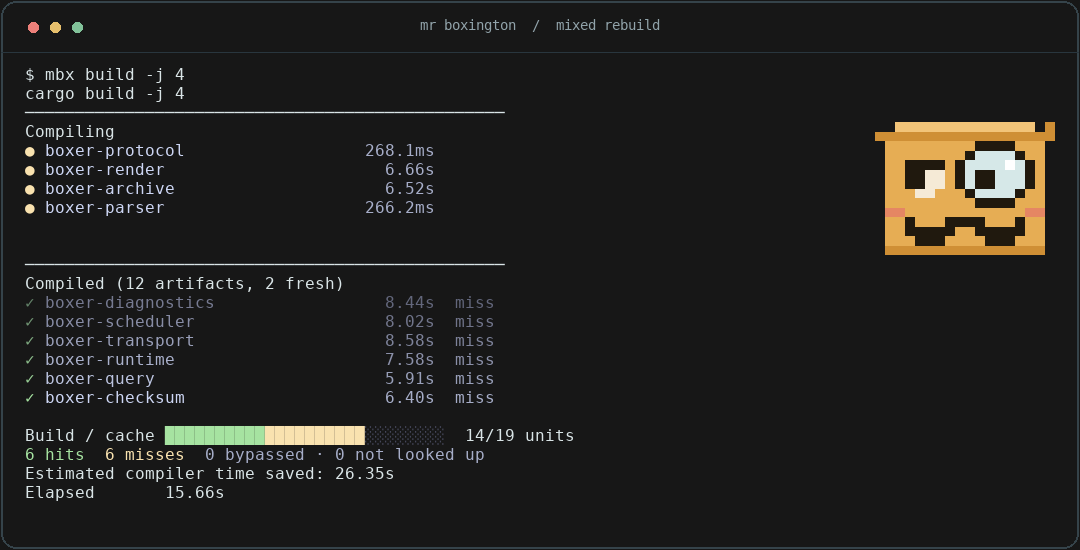
Cargo still resolves dependencies and plans the build. mbx sits around the compiler invocations, restoring outputs it has seen before and running the compiler when it hasn’t. The compiler’s diagnostics and artifact notifications reach Cargo as rustc prints them, so Cargo starts a crate’s dependents while mbx is still storing the result, the same as without mbx. It starts a cache agent inside each build command and exits with that command. There’s no persistent daemon to manage.
Automatically pruned target directories #
Caching alone doesn’t solve the pile of abandoned target directories.
mbx creates a managed target under its cache root and leaves a target symlink in the checkout. Paths like target/debug/my-app still work. A checkout that already has a real target/ has it moved under the managed root on its first build, outputs included, so the move itself doesn’t recompile anything. That happens with or without a terminal, so builds run by agents and scripts adopt too. CI builds leave target/ alone, because a CI cache step that saves target/ would otherwise save only a link. To bring the directories you already have under the same policy in one go:
mbx adopt --recursive ~/src
The managed target directories are collected when their checkout disappears, when they’ve gone unused for 30 days by default, or when together they exceed the configured budget. Collection runs in the background after a build returns, at most once an hour, and the next build reports what it removed. With Cargo 1.100, it also removes the build units inside a live target that no build has used for a month, the leftovers of lockfile updates and toolchain bumps. When the disk itself runs low, mbx collects every five minutes and goes past the budgets, starting with private incremental state and the least recently used targets.
Two settings decide the order. target.keep lists checkouts whose targets are never collected for age or size; target.evict_first lists the ones that go first. If coding agents create worktrees for you, the second one is for them:
mbx settings set target.keep '~/src/app'
mbx settings set target.evict_first .claude/worktrees
mbx settings is new as well. It reads and writes the global config file so you don’t have to go looking for it.
You can inspect the cache and preview cleanup. Here’s illustrative output; counts, sizes, and paths will vary by machine:
$ mbx cache stats
store: /home/you/.cache/mbx/actions
objects: 12480 (8.2 GiB)
action results: 1860 (3.4 MiB)
action store total: 8.2 GiB
checkouts: 6 live, 2 stale
target directories: 8 (24.6 GiB)
learned incremental: 5 directories (3.1 GiB, 5 live, 0 stale, and 0 untracked)
generated source trees: 12 (84.0 MiB)
combined logical total: 36.0 GiB

$ mbx gc --dry-run
would have evicted 640 objects and 95 action results (1.1 GiB logical); 7.1 GiB logical remain
would have dropped 2 stale checkout records
would remove 2 target directories (6.4 GiB logical, 2 abandoned and 0 live); 18.2 GiB logical remain
would remove 37 unused build units from live target directories (1.3 GiB logical)
The dry run leaves the files in place. mbx gc performs the collection immediately.
Budgets scale with the disk, and there are settings for sizes and retention if you want them. If you’d rather think about one number, gc.max_total_size covers the store, managed targets, and incremental state together. The default experience should still be that you build things and mbx takes care of the leftovers.
One shared cache, warm worktrees #
Every participating build uses the same cache on the machine. If two projects compile a dependency with matching inputs, that work can be reused too. mbx keys compilations by their inputs and normalizes known checkout-specific paths, so moving to another directory doesn’t by itself make a build cold.
That now covers crates that read build-script output. Cargo puts OUT_DIR under each checkout’s target directory, so a crate that includes generated code from it used to miss in every new checkout even when the generated files were identical. mbx copies matching output to a content-addressed location under its cache and hands rustc that path instead, so the compilation keys the same way in every checkout. A build script that writes the checkout path into its output still produces a different key in each checkout.
Build your project, then create a worktree at the same commit:
cargo build
git worktree add --detach ../my-project-review HEAD
cd ../my-project-review
cargo build
With Cargo 1.100 or newer, the first build in the new checkout starts by copying the registry and Git dependency units that the other checkout already built. Cargo treats the copies as fresh and skips those units, so the build only compiles or restores what differs:
mbx[target]: copied 302 registry build units from /home/you/my-project
In CI or with output redirected, Cargo’s usual output is followed by mbx’s cache summary. For example, the second build might end like this (illustrative counts, with Cargo’s output abbreviated):
$ cargo build
   Compiling my-project v0.1.0 (/home/you/my-project-review)
...
mbx[cache]: 139 hits, 8 misses, 4 not looked up, 7 bypassed; 0 B downloaded, 0 B uploaded, 12.4 MiB stored locally
Those hits are compilations restored from the shared cache. Misses need compiling, “not looked up” means mbx didn’t have a key yet, and bypasses are work it deliberately left uncached.
The second build can restore cacheable compilations from the first, even though it’s in a different directory with a fresh target. Change a crate and its affected compilations need rebuilding; unchanged dependencies can still be reused. A different compiler, feature set, or other relevant input can produce a different cache key. When a worktree misses work you expected it to reuse, mbx explain --last replays the last build, names the crate where the misses started, and lists which key inputs differed from the other checkout’s build.
This matters even more when several people or coding agents are working in separate worktrees on one machine. Each checkout gets its own outputs while benefiting from the shared cache.
On filesystems that support reflinks, such as APFS, btrfs, XFS, and ReFS, mbx restores files using copy-on-write clones. They share storage until modified, while writes to a restored file remain isolated from the cache. Where cloning isn’t available, which includes ext4, mbx now hard links the cached object into place instead of copying it, so a warm restore doesn’t write every cached byte a second time. The linked object is made read-only so a compiler can’t overwrite bytes other checkouts share, and mbx unlinks a file before it recompiles it. When neither works, mbx copies the files.
Run Cargo commands in parallel #
Two independent Cargo processes don’t coordinate their resource use. Each can start enough compiler processes to keep the machine busy on its own. mbx makes them share one machine-wide resource budget.
If two builds ask for an identical cold compilation at the same time, one compiles it and the other waits for that result instead of repeating the work.
Cargo locks a target directory while it compiles, so a cargo clippy started next to a cargo build used to wait for the build to finish. In a managed target, check and clippy now write to a directory of their own inside it, so the two run at the same time with nothing to configure:
cargo build &
cargo clippy --workspace --all-targets -- -D warnings
wait
Builds keep writing to target/debug, so binaries stay where they always were. Two builds, or a build and a test run, still share target/debug and need separate targets. For example, in a POSIX shell:
CARGO_TARGET_DIR=target/tests cargo test --workspace &
cargo build --workspace &
wait
That lets the commands overlap while sharing cached work and compiler capacity. The architecture docs explain how the scheduling works.
Compile permits stop at the compiler. When several cargo test runs reach their test binaries together, each libtest harness starts a thread per CPU, and together they can swamp a machine that handled the compilation fine. Setting scheduler.tests = true runs the test binaries through the same pool. Each binary waits for permits sized by how many cores it kept busy last time, and builds a test starts, such as trybuild suites, are charged to its permits:
mbx settings set scheduler.tests true
The benchmarks page measures six overlapping check, Clippy, and test jobs on aube, a 15-crate workspace, from an empty store on a GitHub Actions runner with 32 permits. Medians of three trials with mbx 1.19.0:
| Six jobs on aube | Wall time | Peak compilers |
|---|---|---|
| One after another | 132 s | 32 |
| Parallel, without the scheduler | 67 s | 172 |
| Parallel, with the scheduler | 55 s | 31 |
The unscheduled batch finishes faster than running the jobs in turn by oversubscribing the runner more than five times over. The scheduled batch is faster still while never running more compilers than the machine has cores.
You can watch it with:
mbx tui
The build summary also distinguishes hits, misses, compilations it couldn’t look up, and work it deliberately bypassed. A good hit rate isn’t very useful if most of the build never entered the cache.
Watch memory before starting more work #
Running those Cargo commands together is why mbx needs to watch memory, too. Counting compiler processes isn’t enough. Some crates and links need much more memory than others, and the rest of your applications need RAM too.
mbx measures how much memory compilations use and uses that history to decide how much work to run together. A heavy compilation takes a larger share of the budget. A compilation the Linux OOM killer stops is recorded heavier than it measured, so its retry runs with more room.
By default, the scheduler budgets 85% of physical memory, using the container’s limit when applicable. Since 1.17 it also watches live pressure: the kernel’s memory-stall measurements on Linux, and available-memory headroom on macOS. While pressure stays high, mbx pauses new admissions, including compilations it has no history for, then resumes them gradually after five healthy seconds. Running compilers are left alone. On Linux there’s an experimental opt-in that goes further, placing compilers in delegated cgroups and freezing the newest ones while pressure persists, then thawing them oldest first when it clears.
This helps avoid piling more compiler processes onto a machine that’s already under pressure. It’s still an estimate: an unseen crate can use more than expected, and a single compilation that needs more RAM than the machine has won’t fit just because it’s running alone.
See where the time went #
A hit rate on its own doesn’t tell you what to change, so mbx has grown a few ways to look at a build after the fact.
mbx analyze reads the last recorded build, groups its uncached compiler time by cause with the largest first, and shows the chain of units the build waited on. In a workspace where api depends on engine and cli depends on api, editing engine produces:
last recorded build: cargo check
compiler time: 47.7ms in 3 uncached compilations

uncached compiler time by cause

 47.7ms  inputs of engine changed (3)
         engine 17.1ms
         then 2 crates that depend on it rebuilt: cli 17.2ms and api 13.4ms
         Every crate that depends on engine recompiled after it changed. Code
         that changes often costs less in a crate few others depend on.
Other causes include changed compiler arguments or environment, a toolchain change, results that had been evicted, and compilations mbx bypassed along with the reason. The critical path that follows credits each unit with the time it added to the chain. Build-script runs are units too, so a slow build.rs shows up where the crates that read its output waited for it.
mbx stats reports what the cache has saved on this machine since it started counting: compiler time avoided, bytes pruned, bytes that reflinks and hard links kept from being copied, and a conservative estimate of the duplication a separate cache per checkout would have cost. mbx tui shows the same figures live, with an Insights screen for the selected build.
What about CI? #
The GitHub Action installs mbx and, by default, restores a pruned Cargo target directory and registry from the last compatible build, the same kind of archive rust-cache saves, then runs your builds through mbx on top of it. Cargo reuses its own fresh outputs from the archive; the object cache covers what changed. A push to the default branch saves a new entry. Pull requests restore without saving unless you opt in, and fork pull requests are always restore-only. An objects mode exports only the cache entries the job used or produced, for workflows with several target directories or checkout layouts.
For sharing across runners, the action’s remote backend points mbx at the self-hostable cache server or an S3-compatible bucket, including R2 and MinIO. On an EC2 runner with an instance role, an s3:// remote needs no credentials configured at all. Pull requests never publish to a remote, whichever backend you use.
Local development is still where mbx has the most to offer. For CI, measure your complete workflow before switching. The benchmarks explain the scenarios and link to the runs behind the results.
Prior art and limits #
mbx follows earlier compiler-cache work in sccache and kache. kache directly inspired its design; the comparison page spells out what wrapping Cargo gives mbx over wrapping only the compiler. mbx began inside mise’s task runner and became a separate CLI; you don’t need mise to use it.
It won’t cache everything. When mbx can’t describe the inputs precisely enough, it runs the compiler normally. The boundary has moved since September: library compiles that name a native library, host cdylib links on Linux, and -Zbuild-std standard library units are cached now, and make and CMake builds outside Cargo go through mbx exec, which sets CMake’s compiler launchers so later builds use the cache too. Crates whose sources keep changing still get private incremental state that stays out of the shared cache. An opt-in eager_incremental mode seeds that state from the first compilation, for workspaces that expect many edits and have the disk to keep it. The limits page covers the tradeoffs.
A cold build still has to compile, and keeping track of cacheable work adds overhead. The payoff comes when another build can reuse that work, especially after changing branches or creating a fresh worktree.
Try it on a project you build often, then build it in another worktree. I’d like to hear where it saves you time, where it misses work you expected it to reuse, and what still gets in the way.
Mr Boxington also has a theme song now. Pray Silence for Mister Boxington comes with a music video, lyrics, and downloads.