Introducing packslip
On this page
I’m introducing packslip, a signed manifest vendors publish alongside their releases. It tells package managers which binaries to download, how to verify and install them, and where to find matching shell completions and agent skills.
mise supports packslip as a tier 1 backend, preferred over the github and aqua backends for new tools. Completions follow the tool version active in your project, and you can opt in to making that version’s skills available to your coding agent.
The version 1 specification is stable. I’ll show how this works in mise, but packslip is a separate project that other package managers can adopt too.
Try it in mise #
Here’s how to install hk through mise’s packslip backend:
mise use -g packslip:github.com/jdx/hk
mise finds the release, verifies its signature, selects the right download for your machine, checks its declared host requirements and downloaded bytes, and installs the executable. You don’t need the packslip CLI installed separately.
Anyone can publish a project with packslip on GitHub or their own domain, and mise users can install it without a plugin or an entry in a curated registry. Custom domains need a trusted signing key or identity; I’ll cover that below. This is especially useful for internal tools and smaller projects.
Completions and agent skills are two of mise’s most requested features. packslip gives them a place alongside the binaries, while addressing a problem I’ve spent years working around: every vendor has different conventions for distributing software.
Why vendor-built binaries #
Homebrew’s core repository usually distributes its own build from source. I generally want the developers’ own build, what I call vendor-built binaries. That’s where mise has proved most useful: connecting vendors directly to their users.
It also means users can get updates as soon as the vendor publishes them, without waiting for a separate packaging process. mise defaults to a 24-hour minimum release age when selecting new versions, but you can bypass that for tools from vendors you trust by setting minimum_release_age = "0" on the individual tool. See the release-age settings.
Using the vendor’s binary means getting the build they test and release. What’s missing is a shared description of how to consume those releases.
The metadata problem and aqua #
One vendor might ship tool-linux-amd64.tar.gz with the executable at the archive root. Another ships tool-x86_64-unknown-linux-gnu.tar.xz with the executable at tool-1.2.3/bin/tool. Then a release changes that layout, or adds a musl build, and the installer needs to understand the difference. Signature verification has its own variations on top of that.
For many tools in mise, those details live in the aqua registry. Its definitions use templates and version overrides to handle many releases without an update for each one.
When a release changes, the registry may need an update. For example, pnpm shipped musl builds before aqua’s definition selected them correctly, leaving Alpine users with a binary that wouldn’t run. mise bundles an aqua registry snapshot, so getting a fix to users also means shipping and installing a new mise release.
mise’s github backend uses a scoring system to pick the release download whose filename best matches your platform. aqua and github currently handle 86.5% of mise’s tools:
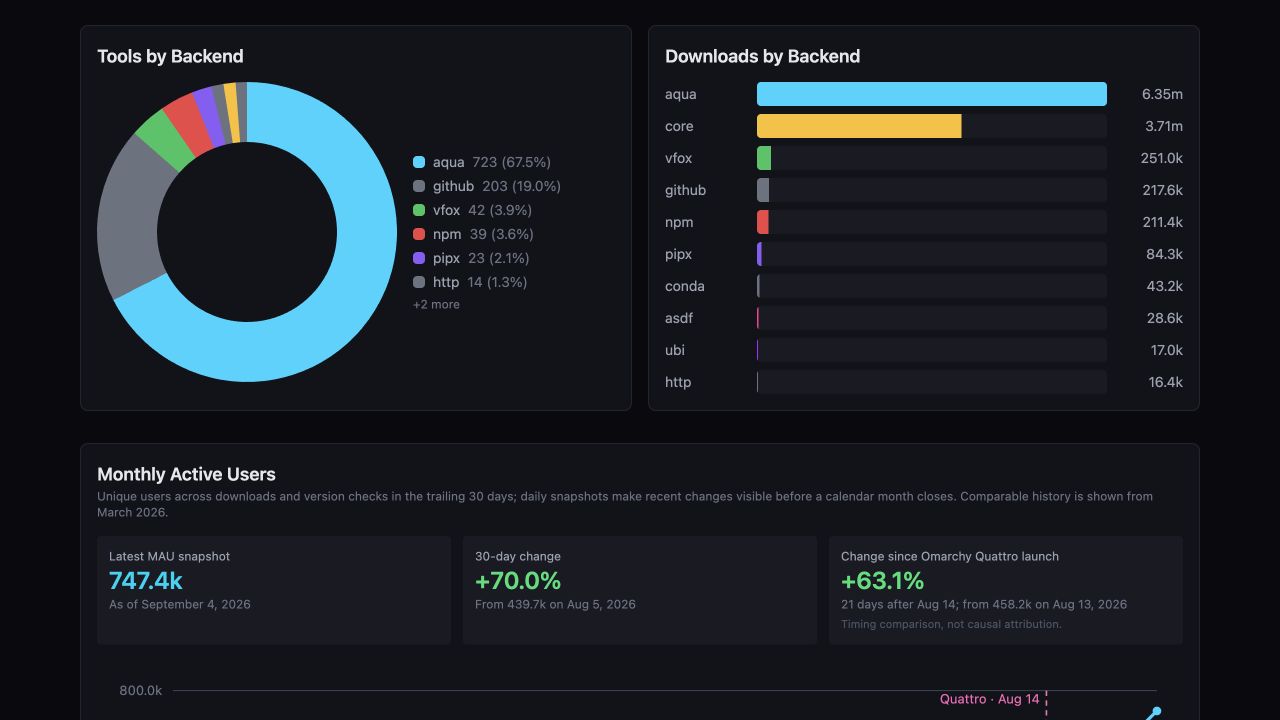
In the September 5, 2026 stats, 86.5% of tools use aqua or github.
With packslip, the vendor generates that description alongside the release and signs it. If an executable moves into a bin/ directory, the new manifest says so. mise reads it directly, along with the declared completions and skills, without waiting for a registry update.
aqua still fills important gaps: it supports tools without upstream changes and handles release schemes outside packslip’s rules. For example, packslip requires semantic versions, while aqua can accommodate other version formats. I’m aiming to cover most tools; aqua’s flexibility and existing verification support remain useful.
What a packslip looks like #
Here’s an annotated example for hk, showing one platform, a CLI spec, and an agent skill. The release file contains this JSON inside a signed Sigstore bundle. Other platforms and verification details are omitted here to keep the example short.
{
  "_type": "https://in-toto.io/Statement/v1",
  "predicateType": "https://packslip.dev/release/v1",
  // Checksums identify the exact bytes of each download.
  "subject": [
    {
      "name": "hk-aarch64-apple-darwin.tar.gz",
      "digest": {
        "sha256": "5529d95c63ea3ba9318f551e19760998a9ddf7ed926a14daf39dc46717ab32bf"
      }
    },
    {
      "name": "hk.usage.kdl",
      "digest": {
        "sha256": "a6efda0e41f66801c1e14b224ab431e8f4c0a1195df2a15ac3db35eba39b4665"
      }
    }
  ],
  "predicate": {
    "project": "github.com/jdx/hk",
    "version": "1.58.1",
    // Repository resources come from this exact commit.
    "source": {
      "repo": "https://github.com/jdx/hk",
      "commit": "f0673b594bd55e8768c47700d1169b0ae618b58c"
    },
    "artifacts": [{
      // Match the user's machine without interpreting the filename.
      "name": "hk-aarch64-apple-darwin.tar.gz",
      "os": "darwin",
      "arch": "aarch64",
      "url": "https://github.com/jdx/hk/releases/download/v1.58.1/hk-aarch64-apple-darwin.tar.gz",
      "format": "tar.gz",
      // Install this executable from the archive root.
      "bin": ["hk"]
    }],
    "resources": [{
      // mise can use this spec to generate hk's completions.
      "kind": "cli-spec",
      "bin": "hk",
      "format": "usage",
      "asset": "hk.usage.kdl",
      "url": "https://github.com/jdx/hk/releases/download/v1.58.1/hk.usage.kdl"
    }, {
      // Fetch this skill directory from the source commit above.
      "kind": "skill",
      "name": "hk-configure",
      "repo": "skills/hk-configure"
    }]
  }
}
Vendors don’t need to write this JSON by hand; the publishing action generates and signs it. mise verifies the signature before using the manifest, then checks each download against its checksum.
Completions that follow your tool versions #
This is one of the parts I’m most excited about.
If you use different versions of a CLI in different projects, you’ve probably thought about which executable is on PATH. You may not have thought about which version your shell completions are for. Often they’re whatever you installed globally, even when the command you’re actually running is a different version.
With packslip, mise can use the completions from the version active in your current directory. Suppose project A uses version 1 of a tool and project B uses version 2, which added a new flag. When you cd into project B, the next tab completion can offer that flag. Go back to project A and you’re back to version 1’s completions. You don’t need to restart your shell.
Continuing with hk, set up its zsh completions like this:
mise completion zsh --tool hk --install
Follow any one-time shell setup instructions it prints. bash, fish, and PowerShell are supported too.
mise installs a small completion stub in your shell. When you press tab, it asks mise for the tool version selected by the configuration for your current directory. mise then supplies that version’s completion source: a vendor-provided file, a usage spec, or a command that generates completions.
Some tools already get completion suggestions by calling the active executable. mise extends that convenience to completion files and specs vendors ship. Install the tool, enable its completions once, and they follow the version you’re using.
Agent skills that come with the tool #
I think agent skills belong in the same category as completions: they’re part of helping you use the software you just installed.
A shell completion tells you which arguments you can type. A skill can tell your coding agent how the vendor expects the tool to be used, which workflow to follow, and which mistakes to avoid. Both can change between releases, so both should be associated with the version you’re actually using.
For example, hk’s hk-configure skill teaches your agent how to add a linter to hk.pkl and check that it runs on the intended files. Those instructions ship with hk, so they can stay aligned with the version you’ve installed.
When you install a tool through packslip, mise downloads its declared skills into that tool version’s installation directory by default. Making them available to your agent is a separate, opt-in step. You can list the downloaded skills for your project’s active tools, then link them into your agent’s skill directory:
mise skills ls
mise skills sync --dir .agents/skills
If you’re comfortable with that, you can keep those links up to date after mise install and mise use by adding this to your mise settings:
[settings.skills]
dir = ".agents/skills"
auto_sync = true
prune = true
Now changing a tool version also updates its skill links, and prune removes mise-managed links that are no longer needed. Your own skills are left alone.
Sync doesn’t run just because you cd, and an already-running agent may need to reload its skills.
If you want to review skill changes in pull requests, keep copies of their contents in Git and leave automatic syncing disabled. That lets you review instruction changes alongside tool version updates.
The completions and skills docs cover the details. The same resource mechanism also supports man pages, CLI specifications, and desktop resources.
Trust, signatures, and stampers #
packslip verifies who published a release and whether its downloads match what they signed. It can’t tell you whether a tool is safe to run or whether its skills give your agent good instructions. You still choose which vendors to trust and which skills to enable.
For GitHub releases, github.com/jdx/hk already tells mise which repository must have signed the release. You don’t need to find and configure a public key yourself. mise also remembers the specific signing workflow, so switching workflows requires an explicit trust decision; a new release tag from the same workflow is fine.
For releases hosted on other HTTPS domains, you configure a trusted public key or an expected signing identity and issuer. mise remembers accepted signers, and mise.lock can carry those pins to other machines. Taking over the download domain alone isn’t enough to replace a release, and signing-key changes require an explicit trust decision. See the pinning docs.
You can also require someone else to review a release before installing it. This is what stampers are for.
A stamper signs a list of releases it approves. It could be a service that scans for vulnerabilities, a registry that reviews releases, or your company’s security team. You configure the stampers you trust, and mise requires approval from at least one of them before listing or installing a version.
For example, a company could approve tool versions after checking them. Developers would still install tools with mise as usual, but unapproved versions wouldn’t be available. Approval pins the exact manifest; mise still verifies the vendor’s signature and downloaded files, and a stamp doesn’t override a vendor’s withdrawal of a release.
This lets a registry focus on reviewing software while vendors maintain the installation metadata. It’s a role the format supports, not an announcement that aqua is adopting it. What approval means depends on what the stamper checks; a vulnerability scan and a manual review are different things.
Stamps are optional. See the stamper documentation to configure one.
For vendors #
If you release prebuilt binaries, you can keep your existing archives and add a packslip.sigstore.json release asset. For GitHub Actions, add a step to your release job after building the artifacts and creating the release. Here’s a shortened version of hk’s workflow. It uses a CLI specification generated from the built hk executable with hk usage > hk.usage.kdl:
permissions:
  contents: write
  id-token: write
  attestations: write

steps:
  # Build your binaries into release-assets/, generate hk.usage.kdl,
  # and create the release first.
  - uses: jdx/packslip@v1
    with:
      artifacts: release-assets/hk-*.tar.gz release-assets/hk-*.zip
      bin: hk
      resources: |
        cli-spec/usage=asset:hk.usage.kdl
        skill/hk-configure=repo:skills/hk-configure
        skill/hk-debug=repo:skills/hk-debug
The action calculates checksums, attests build provenance, signs the manifest through Sigstore using the workflow’s identity, and uploads it. There is no signing key to create or store for this workflow.
The artifact globs should select your installable binary archives. bin: hk finds the executable inside each archive and records its actual path. In this example, the usage spec supplies the information needed to generate completions, and the two skills come from skills/hk-configure and skills/hk-debug in the repository at the release commit.
If your release layout needs more detail, you can supply a TOML manifest with per-artifact declarations. You can also use the CLI outside GitHub Actions and host signed release lists on your own domain. The vendor setup guide goes through those options.
Version 1 fixes the meaning of existing fields and the rules for interpreting a release. Breaking changes require a new format version. The CLI has its own version number, so updating the tooling doesn’t imply changing the format.
Let me know what you think #
I’d love to hear how this works for you, especially the completions and skills. If a tool you use ships a packslip, try installing it through mise. If you maintain a tool, try adding one to a release.
The code is at jdx/packslip, the docs are at packslip.dev, and you can open an issue with bugs or feedback.